4 Add a poll widget to your blog


On this simple post I will explain how to add a poll gadget for blogger

There are several ways to interact with your readers and visitors. The comments section for each post is one way for your readers to interact with you.

 But if you want to find out whether your readers like your template. Here you can not write a topic to know the opinion of visitors and readers through comments


The best way is to open a poll, ask for the opinion of visitors to a particular thing, for example,

1 Tips for choosing your blog template

Tips for choosing your template - No more confusion and thinking


question you posed at yourself, All you want to choose a template or change your blog template, "Are the Red or Black why not the green no no the blue is the best...."

In the end, you find yourself Bored all templates, And dispersion your ideas, So you should know some things before your choice, Especially that the majority likes the constant change

0 Add the number of comments in the title


Subject is clear from the title, Is to explain how to add the number

of comments  in the title As in this Blog


Alawys before change any thing you should to take a backup of

your template.

Now go to " Edit HTML" click on "Expand Widget"

0 Add styled sharing dock widget

Hello all in a new addition to blogger

This add-on would make buttons participation in Dock style


add this widget is very simply, after loggin to your Dashboard


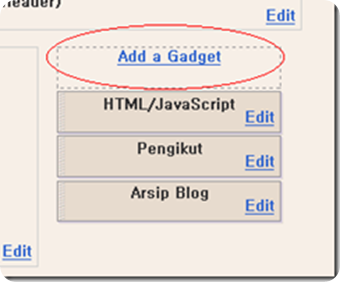
go to "Design", "pageElements" and "Add a Gadget"


Then


Now choose "HTML/JavaScrpit"

and put this code


<style type="text/css">
  #sharedock { position: fixed; bottom: 0; left: 0; width: 100%; height: 90px; z-index: 999; }
  #dock { position: relative; bottom: 0; font: 13px "Trebuchet MS", Verdana, Helvetica, sans-serif; }
  .dock-container { position: relative; background:url(https://blogger.googleusercontent.com/img/b/R29vZ2xl/AVvXsEh_TDxEizBr-bORB3e97L-hCKrv_L_TzwMmuEtLGZUXC-XLB6HwCKgncesQPeOgxhknh1wt_ilHhyphenhyphenHo1yADovZA4rk5jwXs0wE3wenIJeImnE5xeMPHrXKUwHcAD6AeHljqoMRKWrW7Ag8/s1600/0.gif) no-repeat bottom center; height: 50px; padding: 20px 0 20px 0; }
  .dock-container .custom_images a { display: block;  position: absolute; bottom: 0; text-align: center; text-decoration: none; color: #333; cursor: pointer; }
  .dock-container .custom_images span { background: rgba(0,0,0,.75); display: none; padding: 2px 8px; margin-left: 17px; font-size: 11px; color: #fff; -moz-border-radius: 10px; -webkit-border-radius: 10px; }
  .dock-container .custom_images img { border: 0; margin: 5px 0px 10px 0px; width: 100%; }
  </style>
 
<div id="sharedock">
  <div id="dock">
  <div class="dock-container">
 
<div class="addthis_toolbox"> 
 
 <div class="custom_images">
 
 <a class="addthis_button_facebook"><span>Facebook</span><img src="http://addthis.com/cms-content/images/gallery/aquaticus_facebook.png" alt="Share to Facebook" /></a>
  <a class="addthis_button_twitter"><span>Twitter</span><img src="http://addthis.com/cms-content/images/gallery/aquaticus_twitter.png" alt="Share to Twitter" /></a>
<a class="addthis_button_myspace"><span>MySpace</span><img src="http://addthis.com/cms-content/images/gallery/aquaticus_myspace.png" alt="Share to MySpace" /></a>
<a class="addthis_button_stumbleupon"><span>Stumble</span><img src="http://addthis.com/cms-content/images/gallery/aquaticus_stumbleupon.png" alt="Stumble It" /></a>
<a class="addthis_button_reddit"><span>Reddit</span><img src="http://addthis.com/cms-content/images/gallery/aquaticus_reddit.png" alt="Share to Reddit" /></a>
<a class="addthis_button_delicious"><span>Delicious</span><img src="http://addthis.com/cms-content/images/gallery/aquaticus_delicious.png" alt="Share to Delicious" /></a>
  <a class="addthis_button_more"><span>More...</span><img src="http://addthis.com/cms-content/images/gallery/addthis_64.png" alt="More..." /></a>
  </div>
  </div> 
  </div>
  </div>
  </div>
 
  <script type="text/javascript" src="http://s7.addthis.com/js/250/addthis_widget.js"></script>
  <script type="text/javascript" src="http://ajax.googleapis.com/ajax/libs/jquery/1.3.2/jquery.min.js"></script>
  <script type="text/javascript" src="http://addthis.com//cms-content/images/gallery/fisheye-iutil.min.js"></script>
  <script type="text/javascript">
  $(function () { 
  // Dock initialize
  $('#dock').Fisheye(
  {
  maxWidth: 30,
  items: 'a',
  itemsText: 'span',
  container: '.dock-container',
  itemWidth: 50,
  proximity: 60,
  alignment : 'left',
  valign: 'bottom',
  halign : 'center'
  }
  );
  });
  </script>


save and go to your blog show the add-on


If did not work with you this way , try with this


go "Edit HTML"


and look for this

</body>

just before it past the code the above-mentioned


the result will be a nice sharing buttons in your blog


When you pass the mouse icon will be move 


live demo from here : LIVE DEMO

0 add live traffic widget for blogger

how to add live traffic widget for blogger


Special add-on


This service is provided from the site


First, after entry to the site put pressure on the choose your feedjit

Then put pressure on the sing up for free "Feedjit Completely Free"

Then file out : Name, email etc.

Then be transferred to:


1- Choose Ready models style and color That correspond to your site


2- Choose new models Model of your choice


3- select widget width


4- The number of visitors who will appear


5- choose your Platform 


qnd click "GO" the widget will be added automatically


0 Add "Page loaded in ..." For blogger

Add "Page loaded in ..." For blogger


Today with a light added is They show the page load time , as in this picture


This add-on is very easy
As usual we go to control panel, Design and Edit HTML

 - 


First thing take a backup of your template.
click "Expand Widget Templates"
and look for this words
<Head>
 and past this code  under it
<!-- page load timer -->
<script type='text/javascript'>
var d = new Date();
var starttime = d.getTime(); //Get the start time
</script>
now look for this :
</body>
and past just before it this code :
<!-- page load timer start by a4why.blogspot.com -->
<script type='text/javascript'>
var d2 = new Date();
var endtime = d2.getTime(); //Get the end time
//Find the difference between the start and end times
var totaltime = (endtime - starttime)/1000;
//Round 2 decimal places
var result = Math.round(totaltime*100)/100;
//Output results to a &quot;P&quot; element
document.getElementById(&quot;loadtime&quot;).innerHTML = &quot;Page loaded in: &quot;+ result +&quot; seconds&quot;;
</script>
<!-- page load timer end by a4why.blogspot.com-->
 save the template
   

  then go to "pageElements"


and add a gadget "HTML/JavaScrpit"
Put This code and save
<!-- Widget portion -->
<p id="loadtime">a4why.blogspot.com</p>
change "a4why.blogspot.com" with what you want

The result will be show the time of loaded the page In the place that you put the gadget


0 Add a floating Share Buttons to your blog

How to add a floating Share Buttons to your blog

This addon floating moving with the move of the page


First thing take backup of your template.

After logging on the control panel and then design, then edit the Html,

 --->

Look for this code


]]></b:skin>


And Paste this code before it
#sharebox {background-color:#FFFFFF;border-color:#C1CDCD;border-style:solid;border-width:1px;left:103px;bottom:40px;margin-top:10px;position:fixed;width:64px;}#sharebox .float {margin:7px}.FBConnectButton_Text{font-size: 8px;padding:2px 4px 3px !important;}


Then look for the following line:


<div class='post-header-line-1'/>

just before it, paste this code

<b:if cond='data:blog.pageType == &quot;item&quot;'><div id='sharebox'><div class='float'><script src='http://tweetmeme.com/i/scripts/button.js' type='text/javascript'/></div><div class='float'><a href='http://www.facebook.com/sharer.php' name='fb_share' type='box_count'>Share</a><script src='http://static.ak.fbcdn.net/connect.php/js/FB.Share' type='text/javascript'/><div class='clear'/></div><div class='float'><a class='google-buzz-button' data-button-style='normal-count' href='http://www.google.com/buzz/post' title='Post on Google Buzz'/><script src='http://www.google.com/buzz/api/button.js' type='text/javascript'/></div><div class='float'><script src='http://www.stumbleupon.com/hostedbadge.php?s=5'/></div></div></b:if>

Then press to save the template 

0 How to get Backlinks from Google

How to get backlinks from Google


Subject today from the currency of sites or so-called Backlinks and are external links pointing to your site, whether from the same site (internal backlinks) or from other sites (External Backlinks),many webmasters 
 do not know the importance of these linkages, and the truth is that these links is like the money, where That the more links pointing to your site all the many visitors to your site.


2 Tips to avoid closing your Website

 Tips to avoid closing your Website or blog
you Established a blog published by a good number of posts, and published in search engines, and enter many people from everywhere, and suddenly stop all of this, when you enter to find your blog, Google says you


Imagine what you feel then, and what you say that Google is unfair and liar, and etc. .

So I dedicate Here are some tips to avoid closing your blog

Spam,, What is spam

Spam begin with the emergence of service providers, e-mail link your blog
Which was to send messages to a large number of email is spam and abuse
And specialized international agencies had to work laws deter from sending spam messages

And these laws came to limit the advertising messages are large, but so far they use other ways roundabout

Risk of spam

In European countries and the continent of America and some other countries which apply the law and found a radical solution to spam is the Prison, but these are punishment Applied in a few specific countries

But came another solution

Your host or service provider server of the sites of the parent company or with another name the data Center

There is a problem if you tried to send spam, which is
Close your site by the Data Center or by Google


With the payment of a fine by your host, and sometimes it is shutting down your host server as well, "Of course, you will not pay anything"

I advise you to  that Stay away from spam and not send any message disturbing

Another Tip

Do not add your site twice or three or more to search engines 
and this will work for you Problem
And your site will be suspended from appearing search engines and blocked
So the best solution to send your site to search engines every month or fortnightly to indexed the sections and pages on your site properly and without problems
It is possible to add your site every three months or more does not have any problem

Now the important Tip in this topic To be spreading your site properly
Great advice here,to your site appears significantly in the search engines

What is Meta Tag?


Meta tag mission is to get to know your site to search engines with the exception of search engine Google
It is a important words from your content and also the language of the site and also the name of your site and this is very useful for search engines

Where if your website is for softwares and wrote in a Meta Tag "the largest site for softwares" and at the same time visitors came to the search engine and wrote the largest site for softwares. Your site will appear in the first page of search results and here, you know the important of the Meta Tag

not forget writing the largest possible number of words used by the user search engine


I hope to benefit you from these tips


before you see in your site


0 What is SEO - Search Engine Optimization

What is Search Engine Optimization 


Search Engine Optimization or In other words, the way to the most important 
ten results of search engines Such as Google, Yahoo and other search engines 
used by Internet users

Search Engine Optimization very important part of e-marketing

Most Viewed

Share

Twitter Delicious Facebook Digg Stumbleupon Favorites More